Designing Stutter-Affirming Virtual Meeting Support
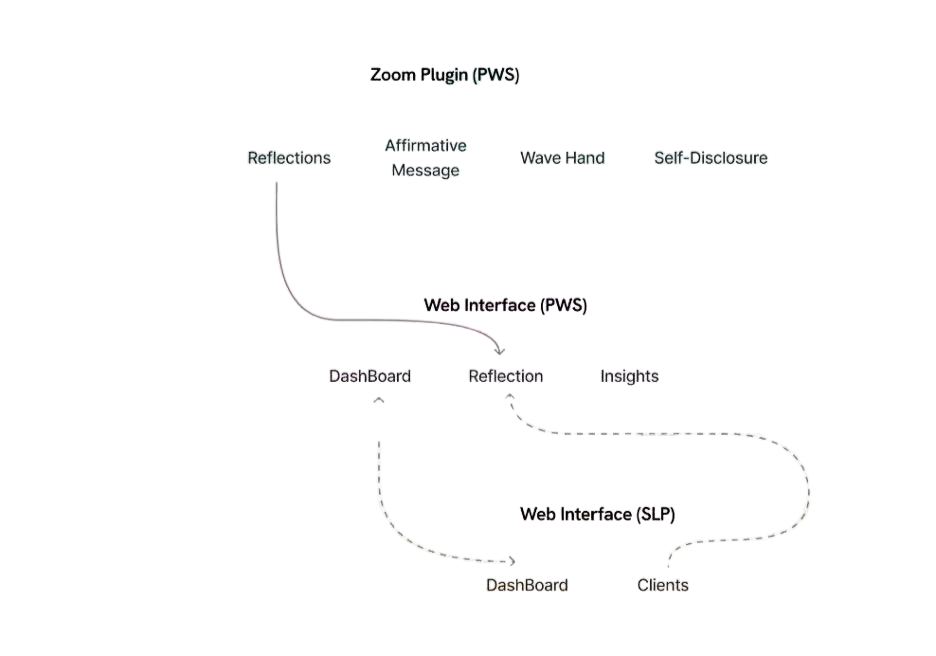
This project explores how virtual meetings impact People Who Stutter (PWS) and investigates how digital tools can better support communication confidence and therapy continuity. Using qualitative research and participatory design methods, the work translates insights from lived experiences and clinical practice into a multi-surface system consisting of a web dashboard and Zoom plugin that supports a goal → track → reflect loop for stutter-affirming communication growth.
Timeline
Aug 2025 to Dec 2025
Role
Product Researcher + UX Designer (team-based, end-to-end)
Key skills
01 Project Process
Methodological Approach
Problem Context
Virtual meetings often increase pressure for People Who Stutter (PWS). Limited control over visibility, fear of interruptions, and expectations of fluent speech can make communication stressful. While Speech-Language Pathologists (SLPs) support communication growth in therapy, tracking progress in real meetings is difficult because experiences are emotional and context-heavy.
Research & Discovery
A human-centered research approach was used to understand meeting experiences and therapy workflows. Market research and participatory co-design interviews with participants who are both PWS and SLPs revealed gaps in emotional support, personalization, and therapy carryover.
Synthesis & Insights
Interview data was analyzed through thematic coding and affinity mapping. This synthesis revealed key needs around visibility control, contextual progress tracking, and greater user agency in communication goals.
Design Exploration
Concept exploration followed a Double Diamond process. Multiple directions were evaluated before selecting a goal → track → reflect system that supports preparation before meetings, lightweight support during meetings, and reflection afterward.
QUICK SNAPSHOT
Who
People Who Stutter (PWS) and Speech-Language Pathologists (SLPs)
What
Researched and designed a web dashboard and Zoom plugin that supports a goal, track and reflect loop for stutter-affirming progress.
When
Aug–Dec 2025
Why
Virtual meetings raise pressure and performance expectations for People Who Stutter (PWS). Most tools over-index on fluency, leaving gaps in confidence and emotional safety that might affect the therapy carryover and limit what SLPs can learn between sessions.
02 What I Did
Core Contributions
Conducted market research across 15+ speech therapy and communication tools.
Synthesized qualitative insights using thematic coding and affinity mapping.
Defined design opportunities around confidence, visibility control, and therapy continuity.
Designed a multi-surface interaction system including a web dashboard and Zoom plugin.
Created prototypes in Figma and conducted usability testing.
01
PROBLEM
Background
People who stutter (PWS) often experience virtual meetings as high-stakes. They experience limited control over visibility, anxiety about interruptions, and pressure to sound fluent. SLPs support communication growth, but progress is hard to track outside therapy because real meetings are emotional and context-heavy Stutter-affirming therapy treats stuttering as a natural variation, prioritizing confidence with self-advocacy and not just fixing speech.
How might we…
How might we help PWS feel supported before, during, and after virtual meetings in a way that is stutter-affirming while giving SLPs meaningful, contextual insight between sessions, without adding cognitive load during high-pressure moments?
02
Research Methodology
Market research
Method: Reviewed 15+ existing tools across speech therapy apps, teletherapy platforms, meeting tools, transcription/AI coaching, and mental-wellness trackers to gain insights and find gaps.
Why: We didn’t want to reinvent “tracking.” We wanted to understand what’s already out there, where tools fail PWS specifically, and what a stutter-affirming product would need to do differently (especially around emotional safety and transparency).
Participatory co-design interviews
What: Co-design interviews with 3 participants who are both PWS and SLPs.
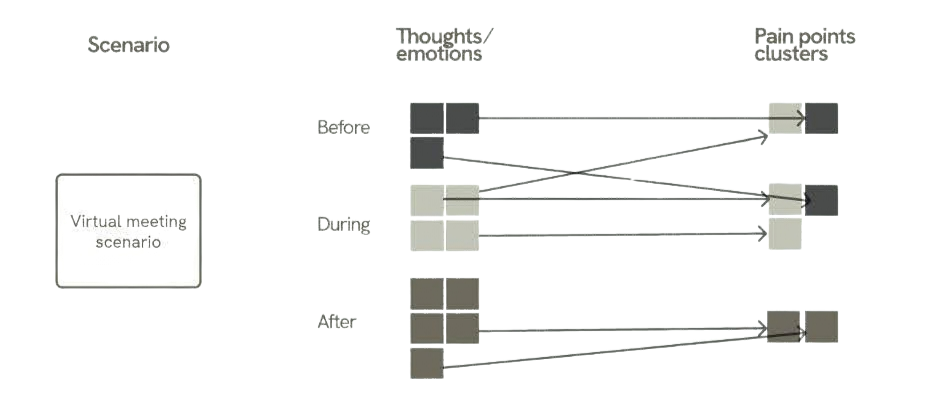
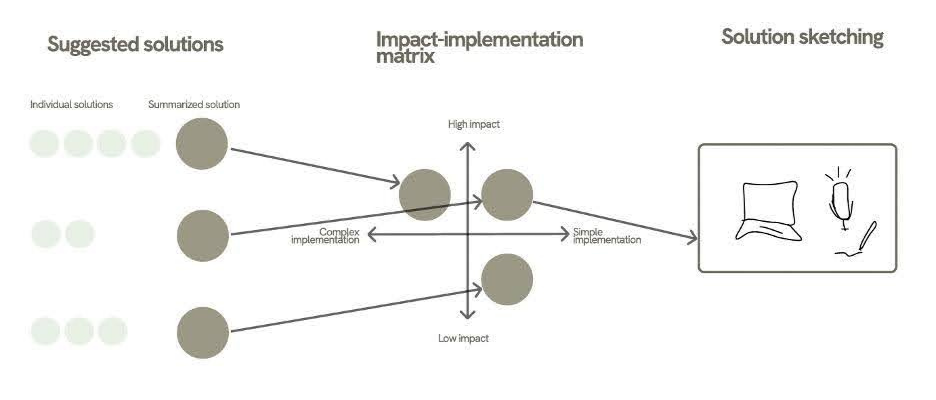
How: Participants chose a real meeting scenario and mapped experience before / during / after, then generated solution ideas, prioritized via impact vs effort, and sketched a concept.
Why: With limited time and budget, recruiting dual-perspective participants gave us lived experience + clinical framing without running separate recruitment pipelines. The before/during/after structure captured the full arc (from anticipation to in-meeting pressure and post-meeting meaning-making), which is where therapy carryover actually breaks.
Data analysis
Thematic analysis: We needed a structured way to turn transcripts into patterns we could design from.
- We built a codebook with 6 buckets (therapy experience, day-to-day stuttering, traditional vs affirming therapy, video call challenges, and coping strategies).
- Why this mattered: It kept tagging consistent across the team and prevented “theme vibes.” It made the data query able and ready for synthesis.

Personal experience with speech therapy

Experiences with stuttering

Traditional speech therapy

Stutter affirming therapy

Challenges with video conferencing as a PWS

Challenges mitigation on video conferencing as a PWS
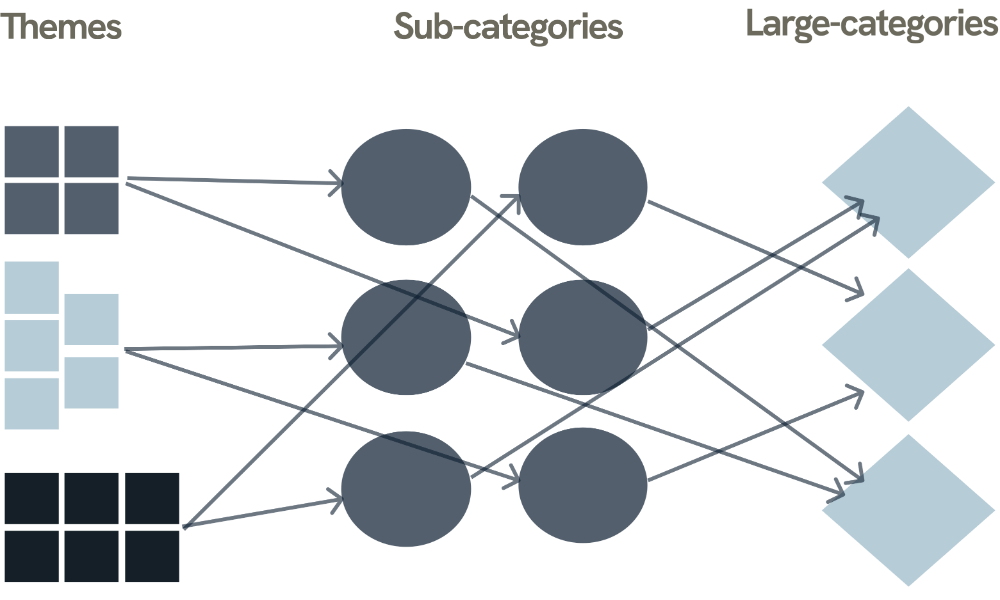
Bipartite diagram: Themes alone can become a flat list. We needed structure that shows relationships.
- We reorganized quotes into sub-categories (specific situations like “camera use” or “metrics during sessions”) and grouped them into large categories (higher-level needs).
- Why this mattered: Stuttering in meetings isn’t one-variable. A single quote can support multiple sub-categories, and sub-categories can roll up into multiple categories. Bipartite mapping made overlaps visible, so we didn’t design siloed features.
Pain point mapping: We translated sub-categories into pain points, then rolled them up into categories and opportunities.
Why this mattered: Traceability. For every solution we proposed, we could point back to the exact quotes/sub-categories that motivated it. It reduces assumption bias in a sensitive space where “help” can easily become judgment.
03 Design Outcome
Key Deliverables
Multi-Surface Support System
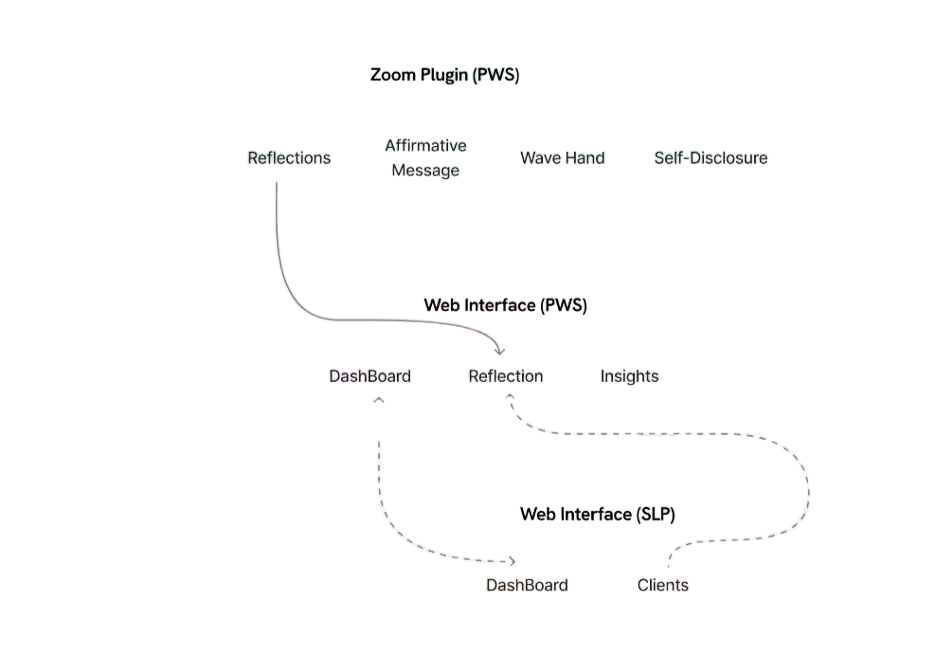
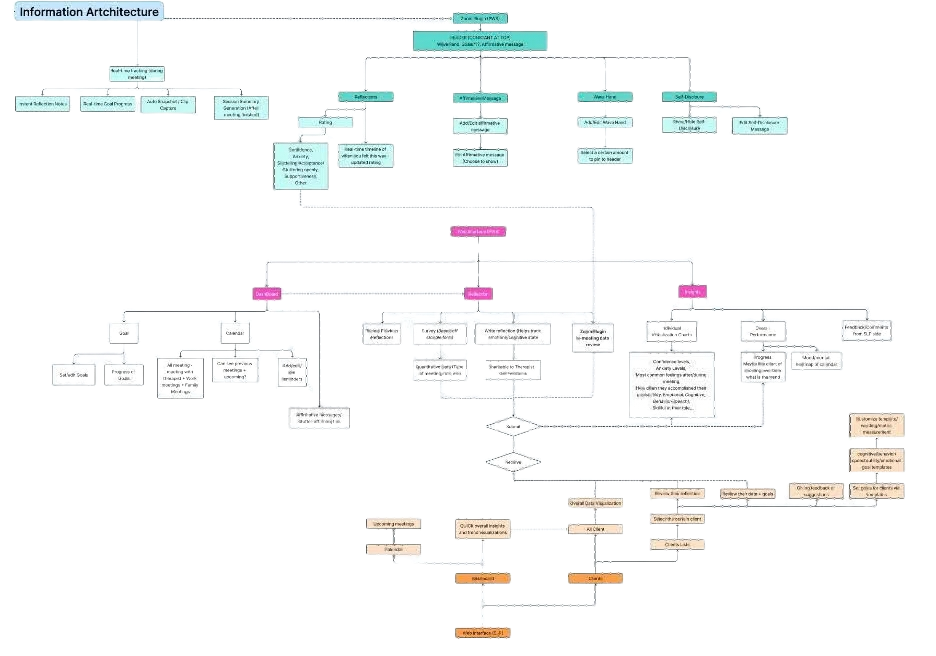
A connected system consisting of a web dashboard and Zoom plugin that supports preparation before meetings, awareness during conversations, and reflection afterward.
Goal → Track → Reflect Loop
A structured workflow allowing users to set communication goals, track progress during meetings, and reflect on experiences afterward to support long-term therapy outcomes.
Lightweight In-Meeting Companion
A Zoom plugin designed to provide optional, minimal interaction during meetings, helping users stay grounded and aware of their goals without increasing cognitive load.
Therapist Insight Dashboard
A web interface enabling Speech-Language Pathologists to review reflections, identify patterns across meetings, and tailor therapy sessions based on real-world communication experiences.
03
Results
Market research insights and gaps
We found consistent gaps across tools:
- One-size-fits-all goals that don’t match how therapy is individualized
- Metric-heavy tracking without context, which can feel evaluative
- Little emotional support during high-pressure moments
- Therapy and real life are disconnected (poor carryover)
- Low transparency (users don’t understand what data means or why it’s collected)
Interview insights
From synthesis, we consolidated needs into these 6 major buckets:
- Progress tracking that doesn’t center on fluency
- Need for self-awareness and emotional progress
- Managing visibility and participation
- Virtual meetings amplifying invisibility and induces anxiety
- Desire for agency and choice over goals/metrics
- Need for better between-session continuity for SLP support

Progress Metrics Still Prioritize Fluency Over Confidence and Identify

Managing Visibility and Anticipation in Meeting

Virtual Spaces Amplify Invisibility and Anxiety for People Who Stutter

Percent fluency metrics prevent therapists from tracking real world carryover

Percent fluency metrics prevent therapists from tracking real world carryover

Speech tools misread and hide stuttering limiting communication and reinforcing stigma
Design direction
We translated those categories into clear “north stars”:
- Redefine progress around confidence, expression, and identity and not just fluency
- Reduce performance pressure in virtual spaces
- Treat stuttering as variation, not error (affirming mindset)
- Normalize emotional reflection as part of growth
- Bridge clinic and real life with contextual reflection (not just numbers)
- Give speakers control over visibility and participation

Redefine progress to prioritize confidence, expression, and identity, not fluency.

Give speakers control over their visibility and participation.

Design safe virtual spaces that support inclusion and reduce performance pressure.

Adopt an affirming tech mindset that treats stuttering as variation, not error.

Normalize emotional reflection as a core part of communication growth.

Bridge clinic and real life through reflection and context, not numeric tracking.
04 Achievements
3
Usability testing sessions evaluating core user flows
Multiple
System touchpoints designed across web and Zoom environments
Qualitative
Research synthesis methods including thematic analysis and participatory design
1
Integrated multi-surface product concept supporting therapy carryover
04
Design Process
Ideation
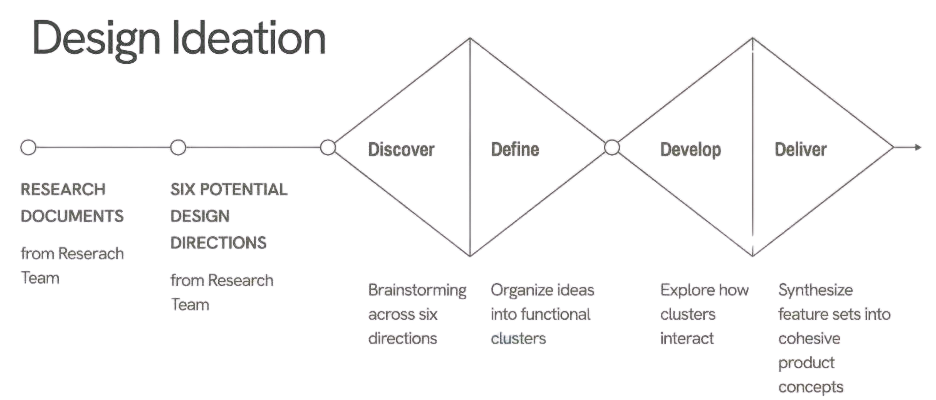
We followed a Double Diamond flow and explored six potential directions:
- Discover: brainstorm widely so we don’t lock into one interpretation of support
- Define: cluster ideas by the problem they solved (confidence, visibility, tracking, reflection, therapy continuity)
- Develop: combine clusters into coherent concepts (not feature soup)
- Deliver: pick one direction to prototype end-to-end
We considered directions like gamification and inclusive learning, but selected Progress Tracking along with Self-Reflection because it best aligned with stutter-affirming therapy principles and created a clear bridge from everyday meetings to long-term growth.
Design decisions
Core product choice: a goal to track then reflect loop
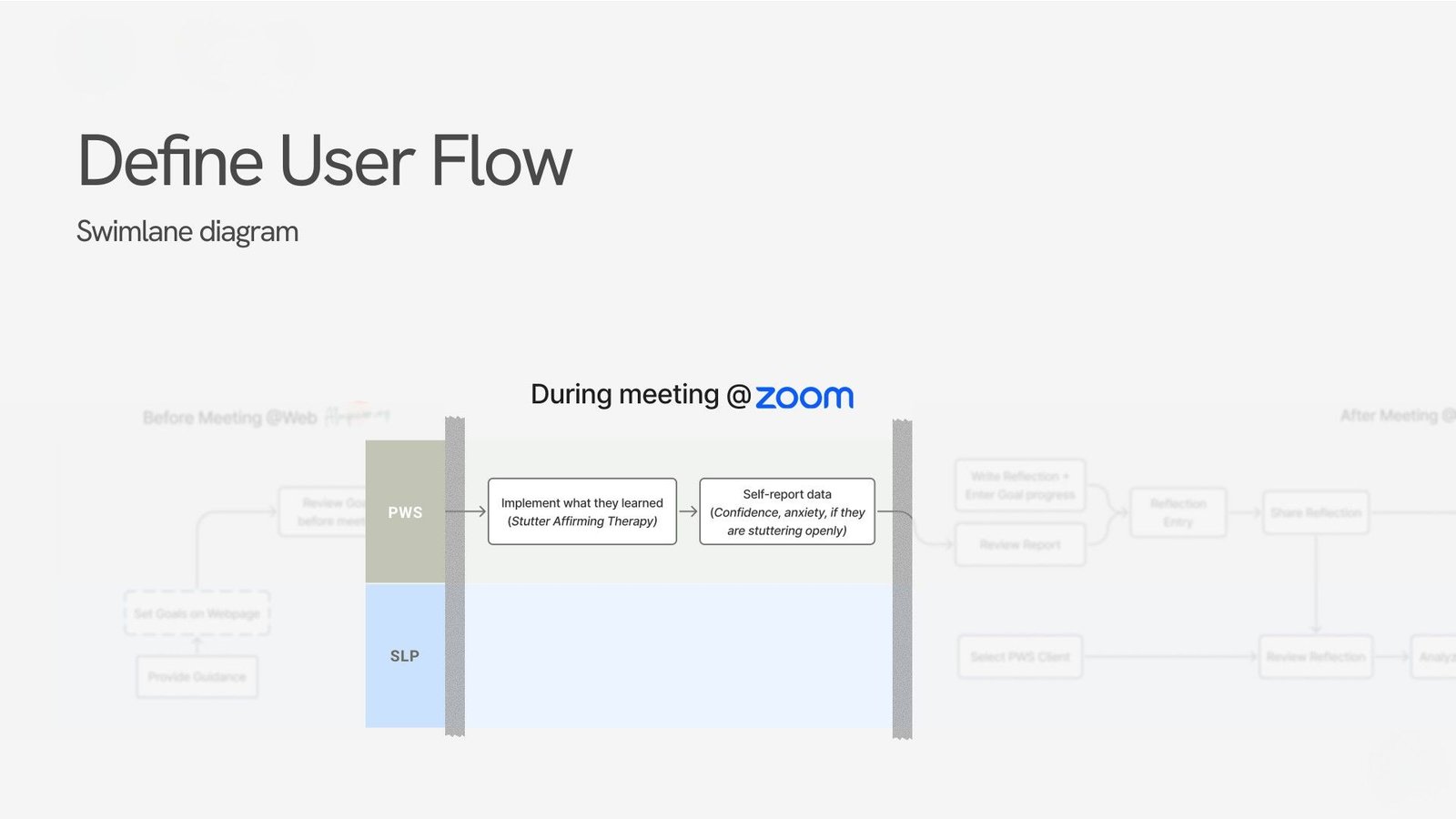
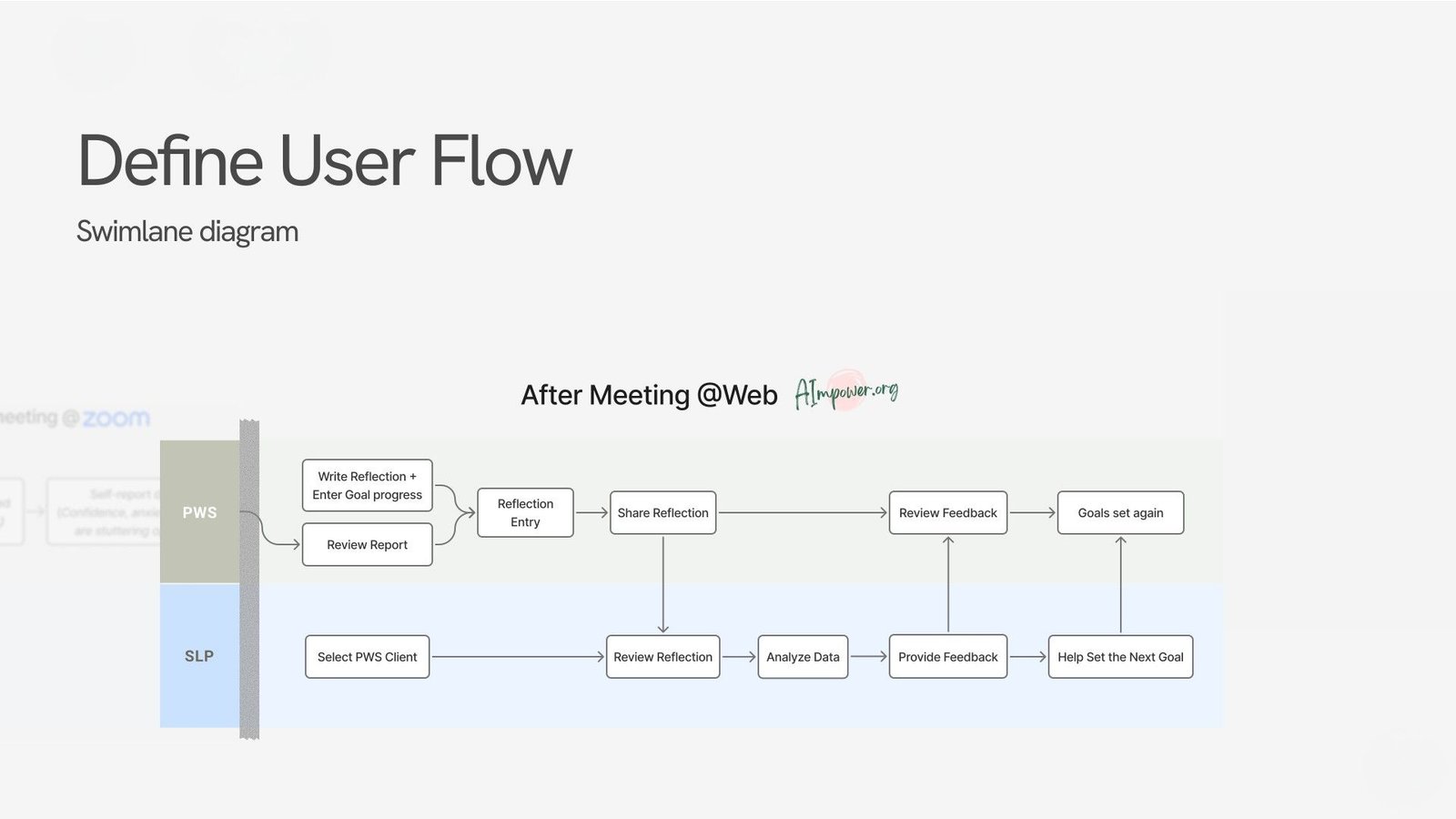
Why: Carryover fails when support is only in therapy or only during meetings. The loop supports preparation (calm), in-moment awareness (high pressure), and meaning-making (after).
Multi-surface design (web + Zoom plugin)
Why: Context matters. Planning and reflection belong on the web (low pressure). In-meeting support must be lightweight and fast (Zoom plugin).


What we prototyped
SLP web view


What it does (functionality):
- Lets SLPs set goals for PWS: what they want to work on) and choose meaningful metrics before a meeting.
- Lets SLPs review client reflections and progress between sessions (instead of relying on memory or a quick recap).
- Helps SLPs see patterns across contexts (what triggers pressure, what strategies worked, where confidence improved).
- Supports feedback and next-step goal setting, so sessions start from real evidence, not guesswork.
Why it’s designed this way:
- SLPs typically don’t see what happens in real meetings. This view gives them between-session visibility without requiring surveillance or constant logging.
- It strengthens the therapeutic loop: the clinician can tailor guidance to what actually happened, making therapy feel more relevant and affirming.
- It reduces burden on PWS to “perform a perfect report” of a stressful meeting, especially when emotions and details are hard to recall later.
Zoom plugin


What it does (functionality):
- Gives PWS a lightweight “meeting companion” they can open during a call.
- Surfaces the specific goal/metrics chosen beforehand (so they don’t have to remember under pressure).
- Enables quick check-ins / simple controls that are fast to use mid-conversation.
Why it’s designed this way:
- Meetings are high-cognitive-load moments. A web dashboard would be too heavy; the plugin keeps actions optional and non-disruptive.
- It supports awareness without judgment: the goal is not to “correct” speech, but to help users stay grounded, track what matters to them, and reduce spiraling anxiety.
- Keeping it inside Zoom reduces context switching (which can increase stress and make people disengage).
PWS web view


What it does (functionality):
- Gives PWS a lightweight “meeting companion” they can open during a call.
- Surfaces the specific goal/metrics chosen beforehand (so they don’t have to remember under pressure).
- Enables quick check-ins / simple controls that are fast to use mid-conversation.
Why it’s designed this way:
- Meetings are high-cognitive-load moments. A web dashboard would be too heavy; the plugin keeps actions optional and non-disruptive.
- It supports awareness without judgment: the goal is not to “correct” speech, but to help users stay grounded, track what matters to them, and reduce spiraling anxiety.
- Keeping it inside Zoom reduces context switching (which can increase stress and make people disengage).
PWS web view
- PWS web (before/after): check plan + reflect when calm
- Zoom plugin (during): track, minimal, supportive presence under pressure
- SLP web: set goals, continuity and coaching between sessions. It’s one loop, split across contexts so each step happens where it’s easiest and least stressful to do.
Design principles we enforced in UI
- Affirmation over correction: language and flows avoid “grading speech”
- Agency: users choose metrics/goals and control what’s shared
- Low cognitive load: in-meeting interactions are minimal and optional
- Prioritizing context raw numbers: reflection provides meaning and reduces misinterpretation
05
Evaluation
Testing method
We found consistent gaps across tools:
- Create a goal
- Track confidence/skills during a call
- Review and reflect post-session
- We also asked open-ended questions about whether the experience felt affirming vs evaluative.
Results
SUS averages across tasks: 65.8 / 90.0 / 60.8.
What worked:
- Calm, clean visual design
- Flows felt intuitive once users found entry points
- In-meeting support and reflection felt meaningful and supportive
What struggled
- Wayfinding and feature discoverability
- Confusion across roles/flow continuity (goal to meeting then reflection)
- Cognitive load spikes when unclear labels or steps appear mid-flow
Changes implemented
- Stronger wayfinding (clearer entry points, labels, and guidance)
- Reinforced the “one journey” feel across surfaces
- Kept the Zoom plugin deliberately lightweight to avoid pressure and overload